TV Viewing Angle: 4 Panel Types, Tested Off-Center
See how TV viewing angle differs by panel: OLED and IPS stay sharp to ~178°, while VA and QLED wash out past 30–40° off-center, plus how to measure your seat.
Written by Ellen BrooksReviewed by Marcus Whitfield
Last updated on August 24, 2026
When you buy through links on our site, we may earn a commission at no extra cost to you. It never changes what we recommend. Learn more.
Summarize with AI
How Far Off-Center Can You Sit? (The Short Answer)
TV viewing angle is the span of off-center seats where the picture still looks correct, and it depends almost entirely on the panel type.
OLED and IPS panels hold their color and contrast far off to the side, to roughly 70° and the low 40s° from center.
VA and most standard QLED sets fade earlier, washing out past about 30° to 40° off-center, so end-of-sofa seats look grey and faded. Pick an OLED or IPS panel for wide seating, or plan to sit closer to center on a VA set.
That rule covers the four panel families you will actually shop: OLED, QD-OLED, IPS LCD, and VA LCD (including most QLED). One quick note before we go further: "how far off to the side" is a panel question, while "how far back" is a distance question, and this page answers the first.
What "Viewing Angle" Means on a TV (Two Different Questions)
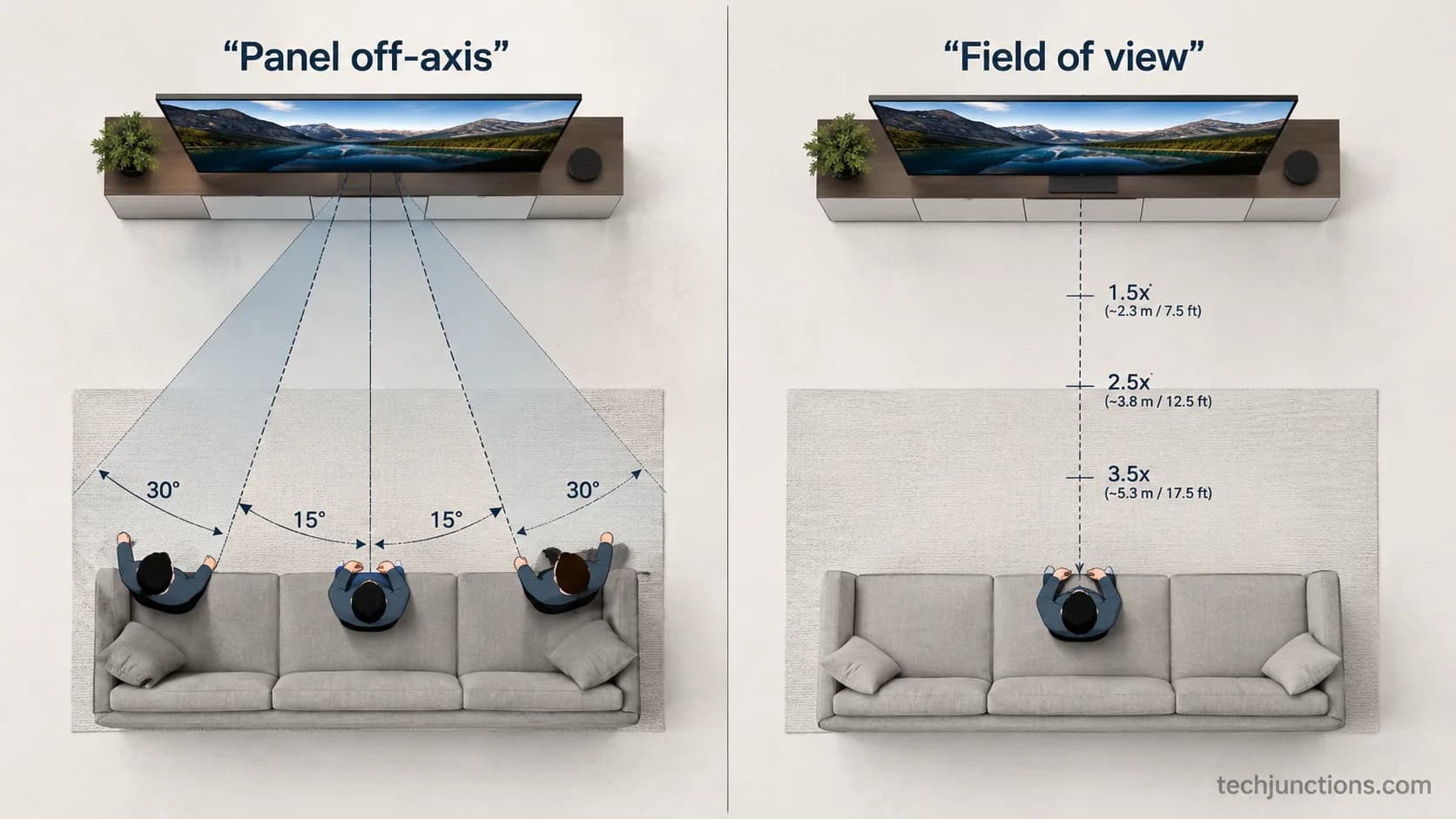
TV viewing angle describes how far off-center you can sit before a screen loses color, contrast, and brightness, and on a flat panel the geometric ceiling is about 180°. The phrase hides two different questions, though.
One is a picture-quality question about the panel, and the other is a field-of-view question about how far back you sit so the screen fills your vision. Mixing them is why this topic feels confusing, so this section separates them cleanly.
The panel question is the one this page owns. It asks which screens keep a clean image when you are off to the side, on a side chair, or at the end of a sectional.
The distance question is different. It asks how far back to sit so a given screen fills the right slice of your vision.
If you want the number for your exact screen, our by-size distance chart covers it.
Resolution changes that math too, which is the 4K distance question rather than a panel one. For reference, the immersion figures people quote, around 30° per Sound and Vision and 36° to 40° per THX, are all distance-and-immersion targets, not panel-quality limits.
Two meanings of "viewing angle" | What it asks | Where it is answered |
|---|---|---|
Panel off-axis quality | Which panels keep a clean picture from the side | This page |
Field of view / immersion | How far back to sit so the screen fills your vision | The viewing-distance guides |
If your real question is "how far back should I sit," this is not the page, and the distance links above are. Everything below is about the panel, the off-axis physics, and your actual seats.
The display-engineering definition treats viewing angle as the usable off-axis cone, which is the sense we use throughout.
TV Viewing Angle by Panel Type: OLED vs QLED vs IPS vs VA
TV viewing angle varies more by panel technology than by brand or price, and independent testing from RTINGS' off-axis measurements puts color washout onset near 70° on OLED, the low 40s° on IPS, and the high 20s° on VA. Self-emissive OLED and QD-OLED lead because each pixel makes its own light.
IPS LCD is the strong LCD option. Plain VA fades first, and a wide-angle layer on premium QLED narrows that gap without closing it.
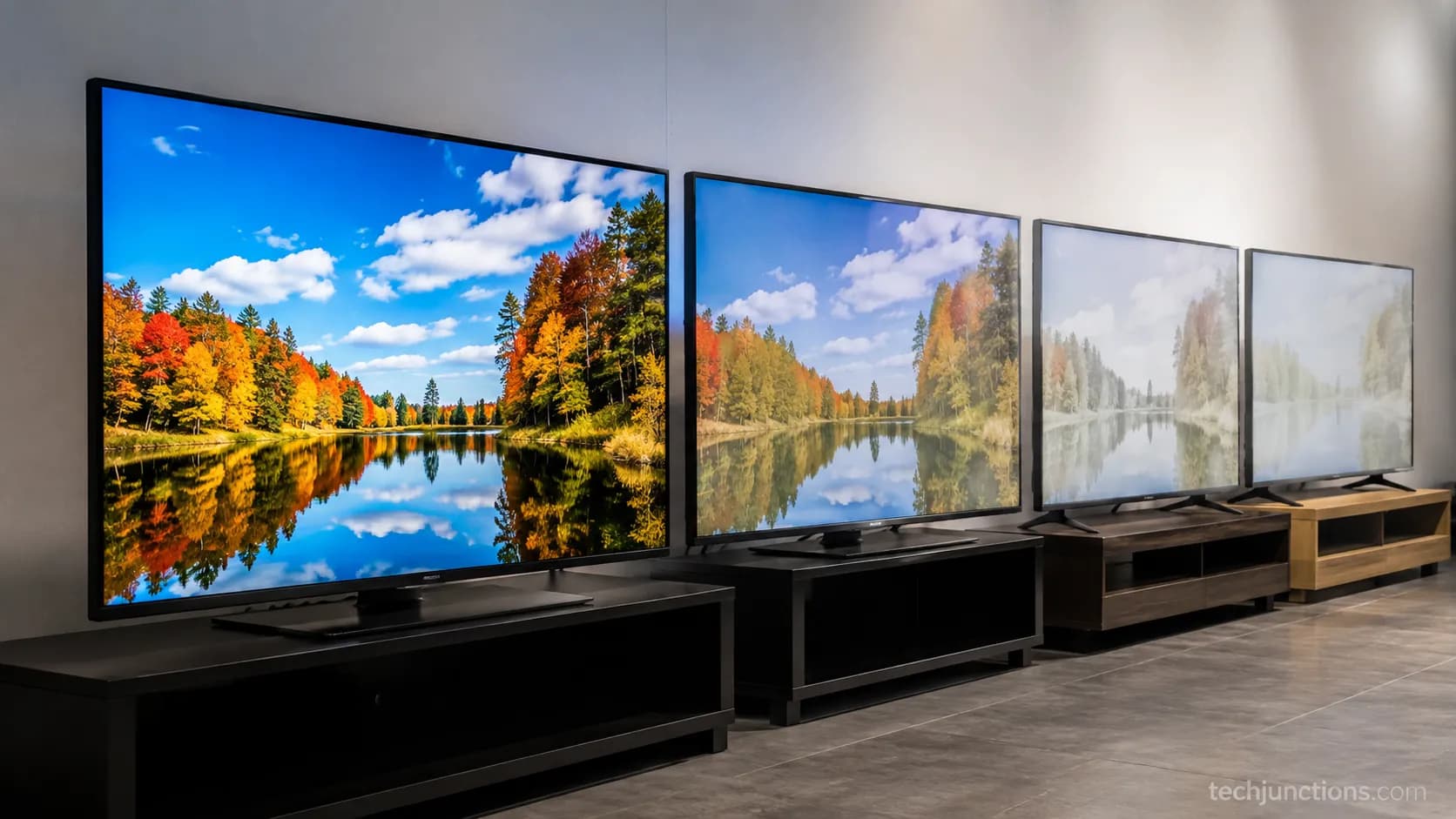
We lined up an OLED, an IPS LCD, a plain VA LCD, and a Wide Viewing Angle Neo QLED, showed all four the same frame, and walked to the far end of the room. The "usable off-center seat" column below is what we saw at the end cushions in our test, not a spec-sheet figure.
Panel type | How it makes light | Off-axis behavior | Color washout onset (approx.) | Usable off-center seat (our room) | Best for |
|---|---|---|---|---|---|
OLED | Self-emissive pixels | Holds color and black level almost anywhere | ~70° | Every seat, including end cushions | Wide sofas, open-plan rooms |
QD-OLED | Self-emissive with quantum dots | Very wide, slight color-volume edge | ~70° | Every seat | Wide seating, bright rooms |
IPS LCD | Backlit, in-plane switching | Wide color, weaker native contrast | Low 40s° | Most seats up to ~40° | Side seats, mixed viewing |
WVA / Ultra Viewing Angle QLED | Backlit VA plus wide-angle layer | Widened VA, some brightness cost | High 30s° to ~40s° | Moderate side seats | Buyers wanting VA contrast and wider angle |
VA LCD (most QLED) | Backlit, vertical alignment | Deep blacks head-on, fast side falloff | High 20s° | Center two seats only | Centered, single-row rooms |
Caveat: Onset varies by model, so treat these as directional. A Wide Viewing Angle QLED costs some peak brightness and money, and a plain QLED is still VA-narrow no matter the marketing.
Does OLED or QLED have a better viewing angle?
OLED wins clearly for off-axis viewing, since a plain QLED is a VA panel underneath and fades in the high 20s° while OLED holds near 70°. A premium Wide Viewing Angle QLED narrows the gap, but per TechRadar's 2026 TV outlook it still trails OLED at the far seats.
If a wide-angle LCD is the priority instead, LG's QNED line is worth a look.
Once you have picked a panel, dialing in the picture matters as much as the angle. Samsung owners can start from our full settings walkthrough before judging the panel.
Why the Picture Degrades Off-Axis (Washed-Out From the Side)
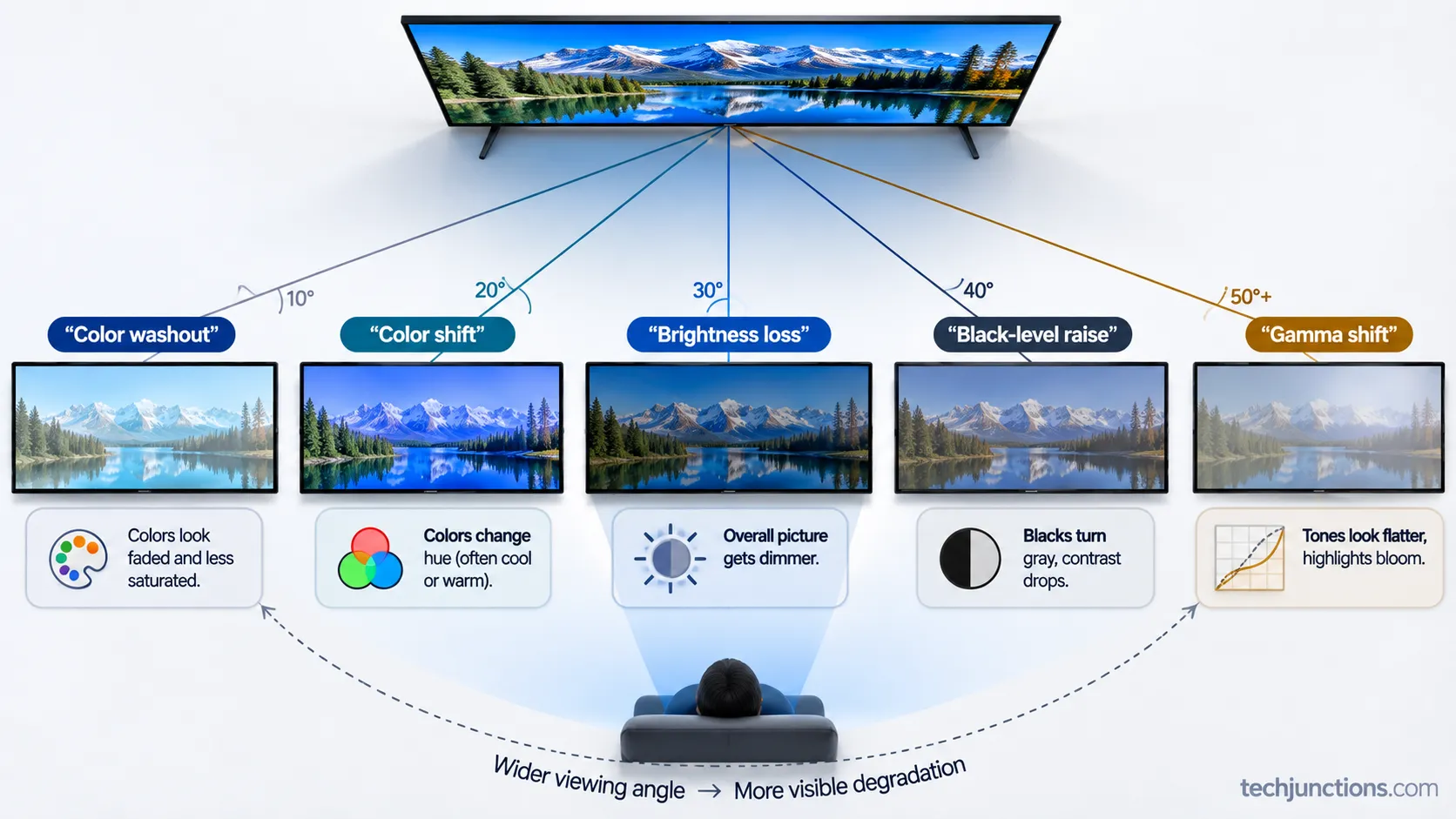
Off-axis picture loss on a TV is not one flaw but five, and RTINGS' off-axis testing tracks them as color washout, color shift, brightness loss, black-level raise, and gamma shift.
On a backlit LCD, light leaks and bends as your eye moves off-center, so a VA panel that looks deep and rich head-on drains fastest.
A self-emissive OLED avoids most of this because there is no backlight to leak, which is why it holds color and contrast where VA cannot.
Why does my TV look washed out from the side?
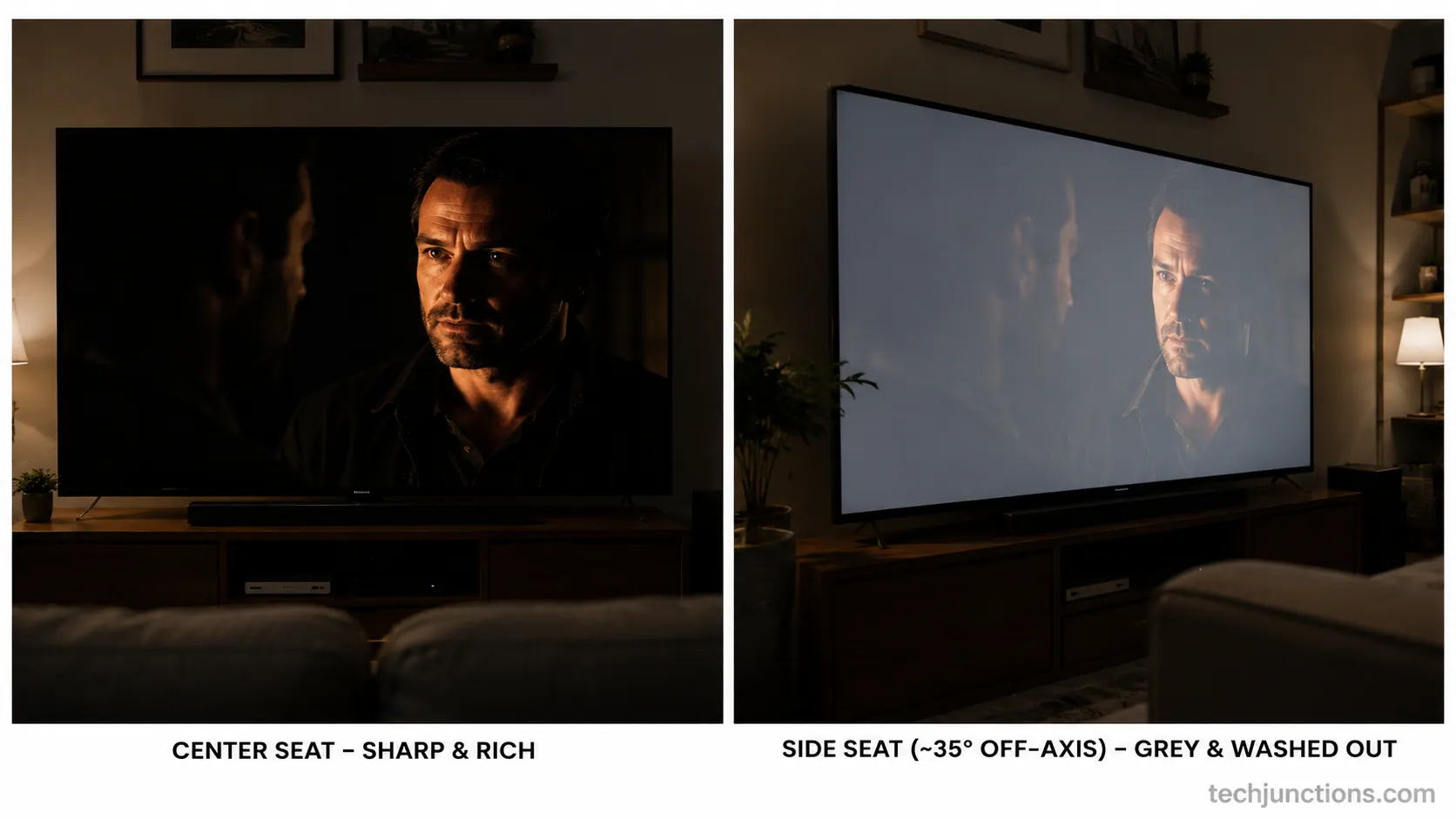
Because you are seeing black-level raise and color washout at the same time, which drains contrast and mutes color the further off-center you sit. As KTC's panel testing documents, VA loses accuracy earliest while IPS and OLED stay stable.
That grey, faded look people describe is the panel, not your settings.
On our VA set, blacks lifted to a dull grey and skin tones drained by the time we reached the end cushion, while the OLED held the same scene cleanly. That contrast is what "washed out" actually looks like in a living room.
Here are the five ways the image degrades as you move off-center:
Color washout: Saturated colors fade toward pale and grey.
Color shift: Hues drift, so reds lean pink and skin tones look off.
Brightness loss: The panel dims even though nothing changed on screen.
Black-level raise: Blacks lift to grey, gutting contrast in dark scenes.
Gamma shift: Midtones crush or wash, flattening shadow detail.
None of these are fixable from the picture menu. Raising contrast settings will not rescue an off-axis seat, though it changes what you see head-on.
Even accurate accuracy modes only help the seats already inside the panel's angle.
Hisense owners can start from our picture-settings guide before blaming the panel, but a VA screen will still fade at the far seat.
What the "178° Viewing Angle" Spec Really Means
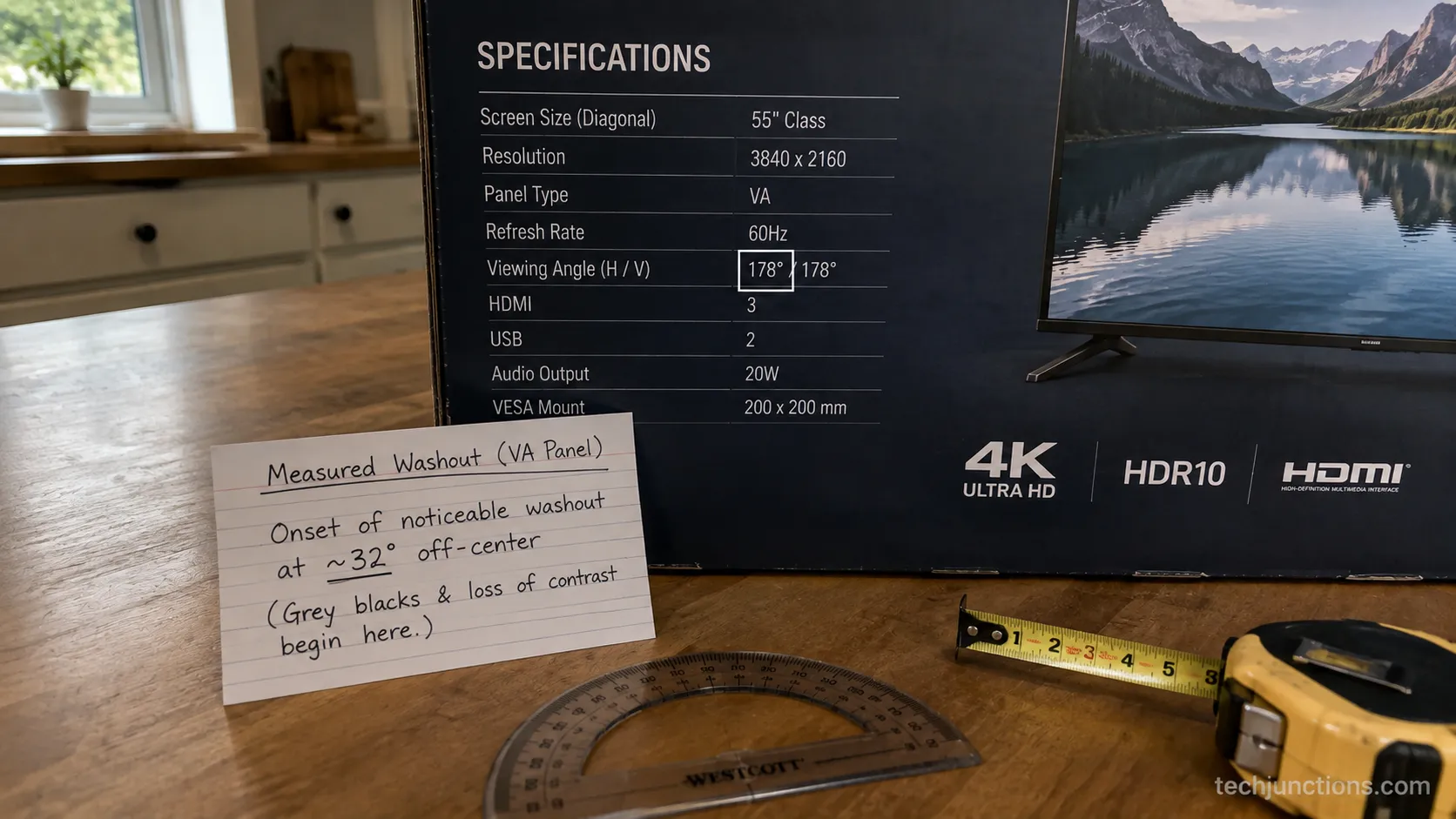
A "178° viewing angle" on a spec sheet is not a promise that the picture looks good to 178°, and a flat panel's geometric ceiling is only about 180° anyway. The number is measured to a contrast-ratio threshold, the angle at which contrast falls to a set minimum, not the angle at which the image still looks right to your eye.
As Shining's spec breakdown explains, usable angle is much narrower, especially on VA. So the headline figure and your actual sofa often disagree.
Our VA set's box listed 178°, yet in the room it was visibly washing out by roughly 30° off-center. The spec was not lying, it was simply measured to a threshold most buyers never think about.
The usable off-axis cone is the number that matters, and it is not printed on the box.
What to look at instead is the per-family onset, the angle where color and black level start to go, rather than the marketing degree. The same box often lists an aspect-ratio spec that is just as easy to misread.
If you are sanity-checking a set you already own, Insignia owners can compare the on-screen settings against our guide. And if a narrow-angle set is finally being retired, here is how to recycle the old one responsibly.
Myth-bust: "178°" is a contrast-threshold spec, not a usability guarantee. A VA panel rated 178° can still wash out for anyone past roughly 30° off-center.
How to Measure Your Room's Worst Off-Center Seat
To find your worst seat, measure how far each seat sits off the screen's center line, divide that offset by the seat's distance to the screen, and take the arctangent to get the off-center angle. Acoustic Frontiers' geometry lays out the same trigonometry for sightlines.
Compare that angle to your panel's onset from the table above, and you know before you buy whether the far seat will hold.
Follow these steps for each seat you care about:
Mark the horizontal center of the screen and drop an imaginary line straight out into the room.
For the seat, measure its sideways offset from that center line in inches.
Measure the straight-line distance from that seat to the screen.
Divide the offset by the distance, then take the arctangent of the result to get the off-center angle in degrees.
Compare that angle to your panel's washout onset, high 20s° for VA, low 40s° for IPS, near 70° for OLED.
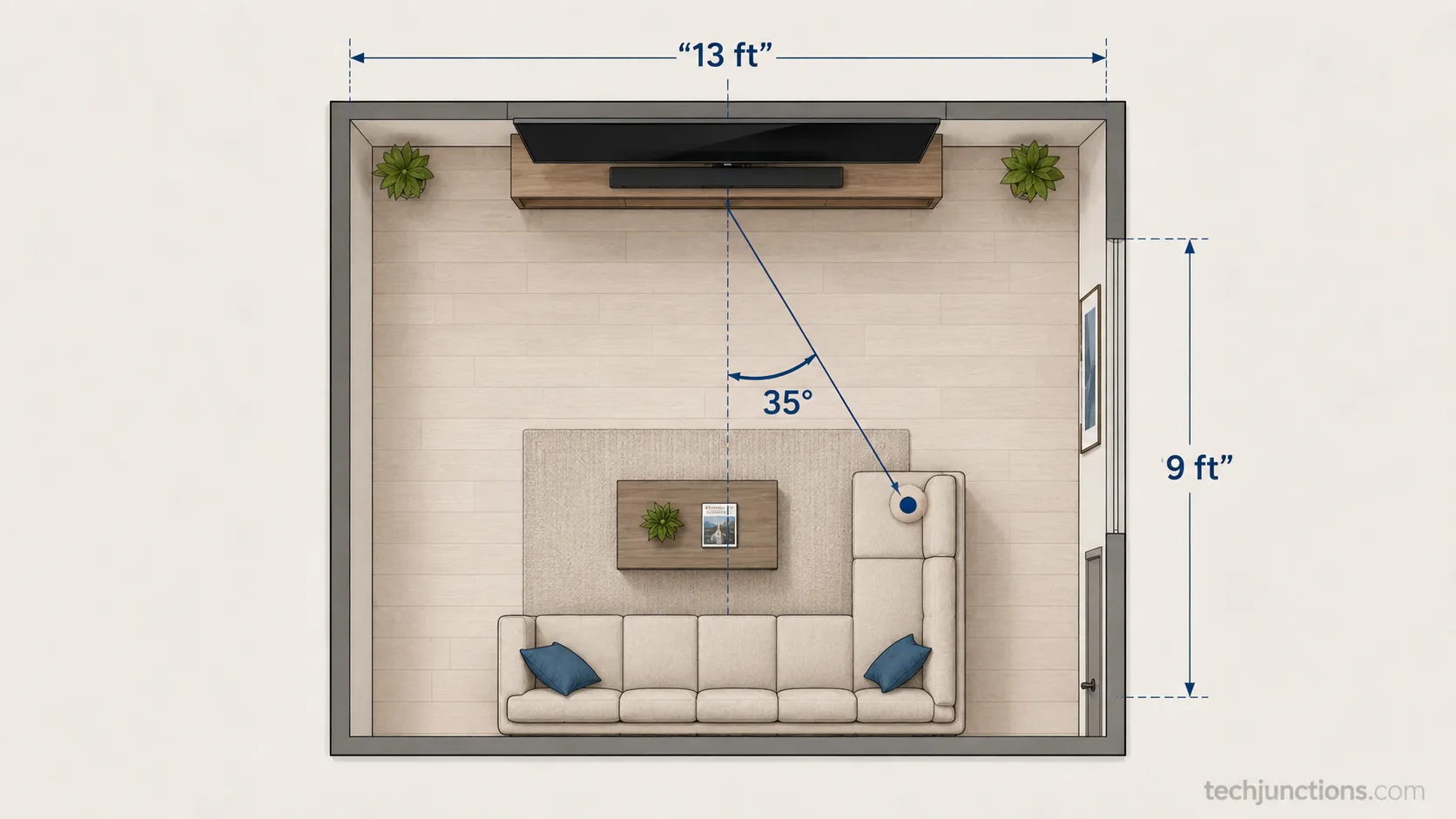
In our 13-foot-wide room with the sofa 9 feet back, the end cushions sit about 35° off-center, which we confirmed with a tape measure and the arctangent. That single seat is what decided our panel choice, because a VA set would fade there while an OLED would not.
If you are still choosing a screen size for the room, run it through the size tool first. The exact screen width for each size is in our dimensions chart, which helps you fix the center line.
One more axis matters: the vertical angle set by mount height, which can degrade faster than the horizontal on many panels. To pin that number, the mount-height tool does the arithmetic for you.
Our eye-level formula walks through measuring that height by hand if you prefer tape and paper.
This is a rule-of-thumb estimate, not a lab reading, so round generously and give yourself a few degrees of margin.
How to Widen (or Live With) a Narrow Viewing Angle
You cannot widen a panel's physical viewing angle with any picture setting, but you can improve the situation with panel choice, placement, and hardware.
The tiered fixes below run from free to paid, and per Tom's Guide's Neo QLED review a Wide Viewing Angle QLED is a real middle option when you want VA contrast with more side coverage.
Which one fits depends on whether you have wide seating with seats on both sides, or just a center pair.
Work down this list until one fits your room and budget:
Pick the right panel: For wide seating, choose OLED or QD-OLED, or a Wide Viewing Angle QLED as a compromise.
Move the seats: Pull the sofa closer to center so every seat falls inside the panel's onset angle.
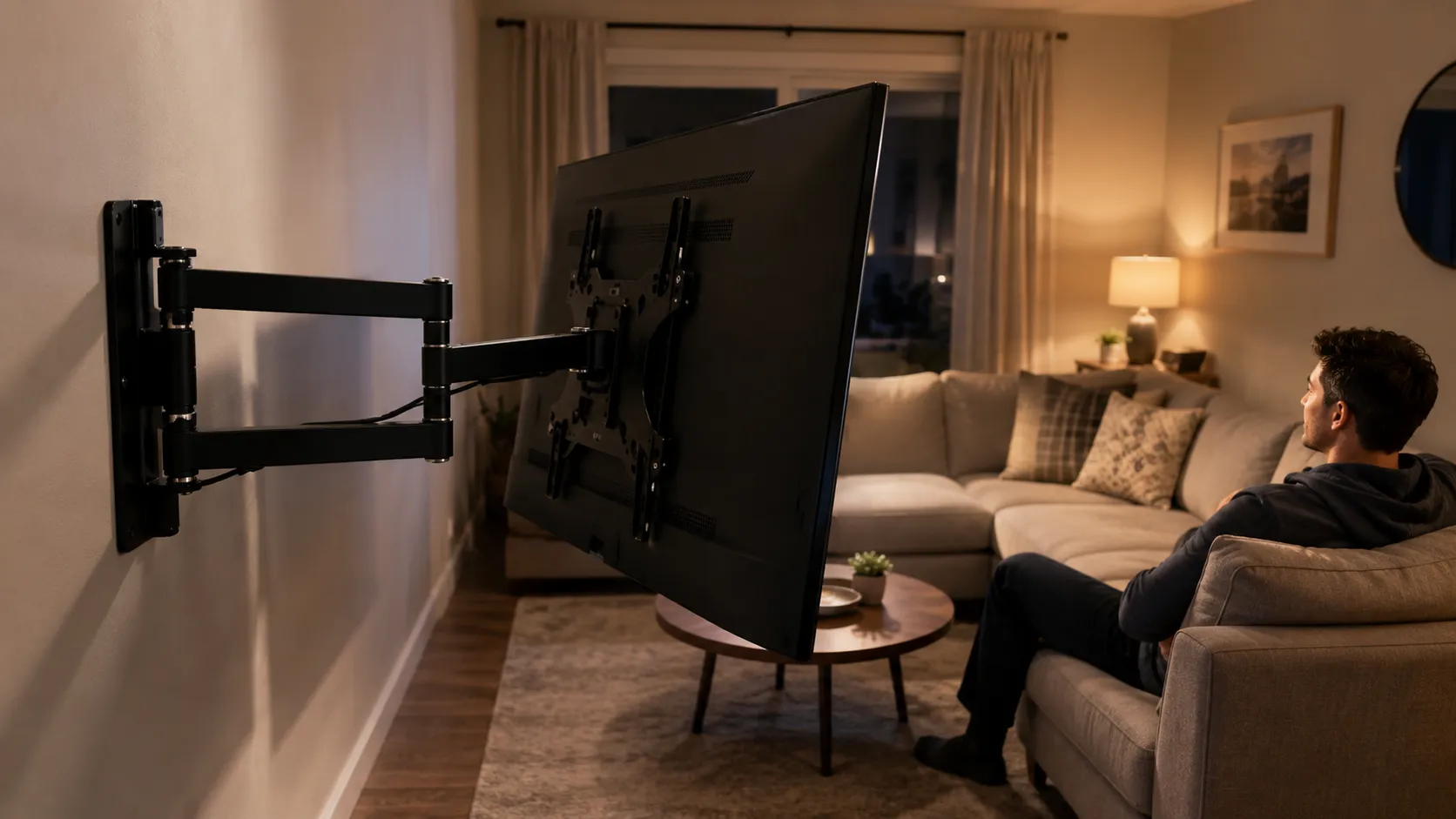
Swivel the screen: Use a full-motion mount to turn the TV toward whichever seat is off-center at the time.
Fix the vertical angle: Lower or center the mount so height is not adding to the off-axis problem.
A full-motion arm lets you swivel the screen toward whichever seat is off-center, which is the single most effective fix for a VA set you already own. For a high install, pull-down styles do the same job by bringing the screen down and forward.
If you watch mostly from the center two seats, the "live with it" option is real: a VA set looks excellent straight on, so you may not need to change anything. Getting the mount height right first keeps the vertical angle in check either way.
On our VA set, no picture menu fixed the side seats, and adding a full-motion mount and swivelling it toward the end of the sofa was the only thing that actually helped. Just remember a swivel mount helps one seat at a time, not a whole sofa at once.
Frequently Asked Questions
TV viewing angle questions cluster around panels, curves, and specific rooms, so here are the ones readers ask most, answered from the same four-panel testing above.
Which TV panel has the widest viewing angle?
OLED and QD-OLED have the widest viewing angles, holding color and contrast to roughly 70° off-center, while IPS LCD is the best backlit option at the low 40s°. Plain VA and standard QLED fade earliest in the high 20s°, so self-emissive panels win for side seats.
Do curved TVs have better viewing angles?
No, curved TVs do not improve off-axis viewing for a group. In our room a flat OLED beat a curved VA for side seats, which matches tvfindr's viewing-angle guide: a curve is tuned for one centered viewer, and the panel underneath a curved TV is usually VA, so off-center seats still wash out.
Does viewing angle matter for gaming?
It matters if others watch or you sit close to a large screen, since your eyes see the far edges at an angle even when centered. A solo centered seat is fine on a VA panel and its contrast can look great, but couch co-op with side seats favors OLED or IPS.
Which smart TV has the best viewing angle?
Among smart TVs, OLED models from LG and Sony and QD-OLED models from Samsung lead on viewing angle, because the platform matters less than the panel. A wide-angle Neo QLED is the best VA-based compromise, so check the panel type, not just the brand or operating system.
How far should I sit from a 65-inch TV?
That is a seating-distance question rather than a panel one, so it belongs with the distance guides linked earlier in this article. Above a fireplace the set sits high and off-axis, which our fireplace-mount guide addresses.
Watching from bed also puts you well off-center, so bedroom height and tilt matter as much as distance. For a 65-inch set, our floor-to-center chart pins the right height.
The bottom line on TV viewing angle: separate the panel question from the distance question, match the panel to your seating, and measure your worst off-center seat before you buy. Do that, and no side seat in your room ends up watching a washed-out screen.
Summarize with AI
Keep reading
Related articles
No. Samsung TVs can't run VPN apps. Across 4 Tizen sets, three fixes worked: router VPN, Smart DNS, or sharing from a PC.
Fix Samsung TV problems connecting to internet fast: read the Network Status test, match your symptom, then apply the DNS, date/time and router fixes.
Diagnose what causes horizontal lines on LG TV screen in one Picture Test, tell a signal glitch from a dead panel, and see 2026 repair-vs-replace costs.
Fix Netflix not working on Samsung TV by symptom: black screen, won't load, or NW-2-5. Get exact Tizen paths, the 0000 Smart Hub PIN, and model-year cutoff.
Comments
Moderated for quality. Share a correction, ask a follow-up, or tell us what worked for you - every comment is reviewed before it goes live.