How to Connect LG Soundbar to TV (We Tested 4 Ways)
Connect an LG soundbar to your TV fast: how to connect LG soundbar to TV via HDMI ARC, optical or Bluetooth, plus fixes for no sound.
Written by Derek WhitfieldReviewed by Marcus Whitfield
Last updated on September 24, 2026
When you buy through links on our site, we may earn a commission at no extra cost to you. It never changes what we recommend. Learn more.
Summarize with AI
The fastest, best-sounding way to connect an LG soundbar to a TV
HDMI ARC is the recommended way to connect an LG soundbar to your TV.
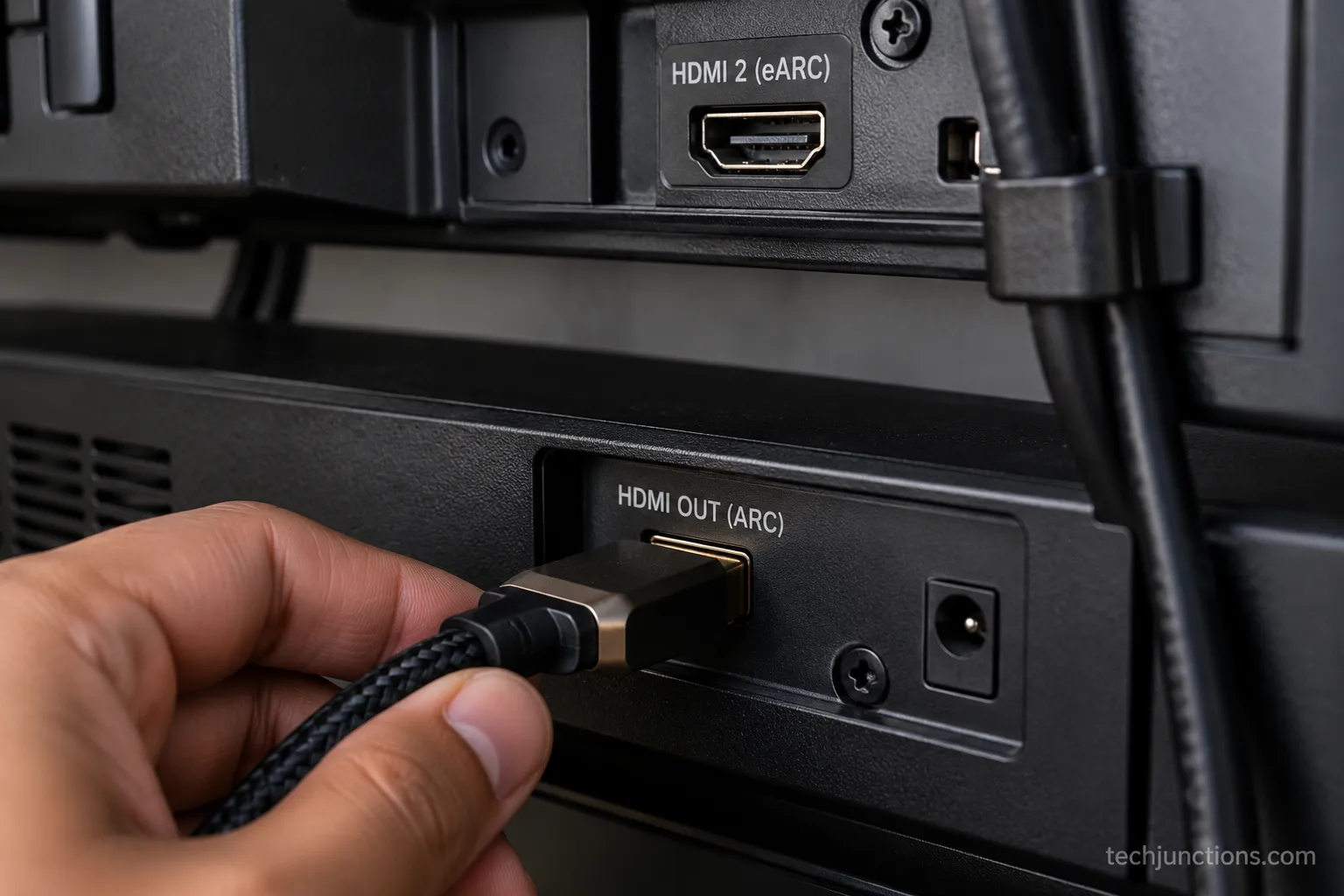
Connect an HDMI cable from the soundbar’s HDMI Out (ARC) port.
Connect the other end to the TV’s HDMI ARC port.
On the TV, go to Sound Out and select HDMI ARC.
Other connection options:
Optical: Use this if your HDMI ports are already occupied.
Bluetooth: Use this for a wireless, cable-free connection.
LG WOWCAST: Use this to send lossless audio wirelessly between a compatible LG soundbar and LG TV.
If there’s no sound:
Check the TV’s Sound Out setting.
If using optical, check that the optical audio output format is set correctly.
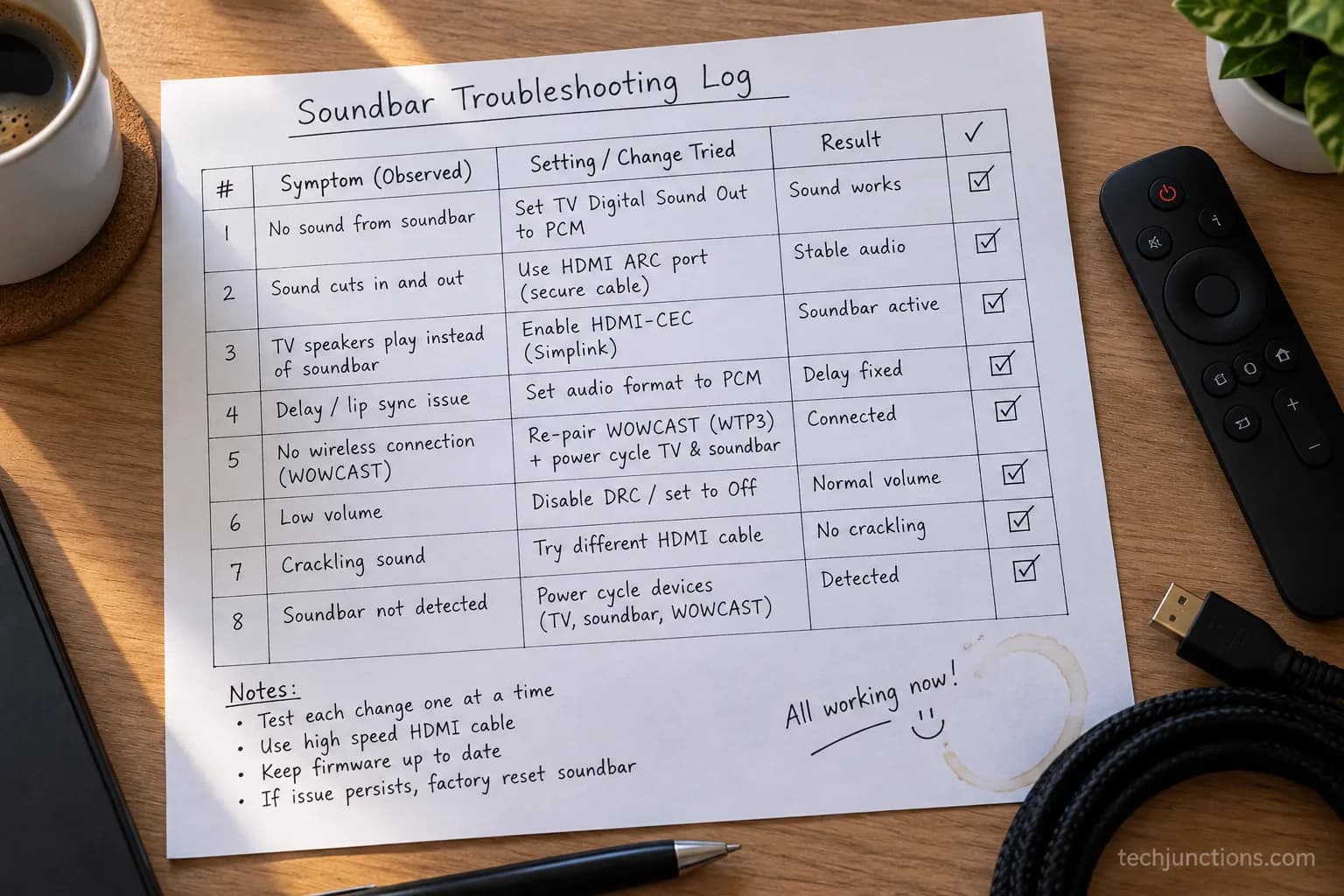
Make sure Simplink (HDMI-CEC) is enabled.
These settings are common causes of no sound and don’t necessarily indicate a faulty soundbar.
We spent a weekend running all four connection methods on the same LG bench, one after another.
This guide is the result: the route that actually sounds best, the two silent settings that trip people up, and what to do when the TV refuses to play through the bar at all.
The 60-Second Answer: Start With HDMI ARC
The best way to learn how to connect LG soundbar to TV is to start with HDMI ARC, the single cable that carries television audio back to the soundbar at full quality.
The HDMI standard's ARC and eARC channel exists precisely for this: one cable, both directions, no separate audio run.
On our LG C3 OLED paired with an LG S80TR bar, HDMI ARC delivered sound in under a minute once the Sound Out setting was correct.
Plug the HDMI cable into the soundbar port labeled HDMI Out (ARC), then into the one TV port labeled HDMI ARC or eARC. Open the TV settings, choose Sound Out, and select HDMI ARC.
That is the whole happy path. Optical, Bluetooth, and WOWCAST each earn their place below, but ARC is where most people should begin.
LG Soundbar Connection Methods Compared
An LG soundbar connects to a TV four ways, and the right one depends entirely on the ports you have.
HDMI eARC carries lossless formats like Dolby Atmos, while plain ARC is limited to compressed 5.1, a distinction Sonos explains clearly in its ARC versus eARC breakdown.
Optical is the reliable fallback when every HDMI port is taken. Bluetooth trades quality for zero cables.
WOWCAST is LG's own wireless route. The table below is the decision in one glance.
Method | Audio quality | One-remote control | What you need | Best for |
|---|---|---|---|---|
HDMI eARC | Highest (lossless, Atmos) | Yes, with Simplink | A spare HDMI eARC port | Newer LG TVs and bars |
HDMI ARC | High (compressed 5.1) | Yes, with Simplink | Any HDMI ARC port | Most setups |
Optical | Good (up to 5.1, no Atmos) | No | An optical audio out port | Full or older HDMI ports |
Bluetooth | Fair (lossy, some lag) | No | Bluetooth on both devices | Quick, cable-free listening |
WOWCAST | Highest (up to 12ch lossless) | Yes | An LG Wi-Fi soundbar | Wireless without quality loss |
The channel bandwidth gap is real: eARC over HDMI 2.1 supports far more audio data than ARC, which SoundGuys documents in its eARC explainer.
That is why the port label matters more than the cable.
For a plain-language primer on why that bandwidth difference decides whether you get Atmos at all, TechRadar's ARC and eARC guide is a useful second read before you commit to a port.
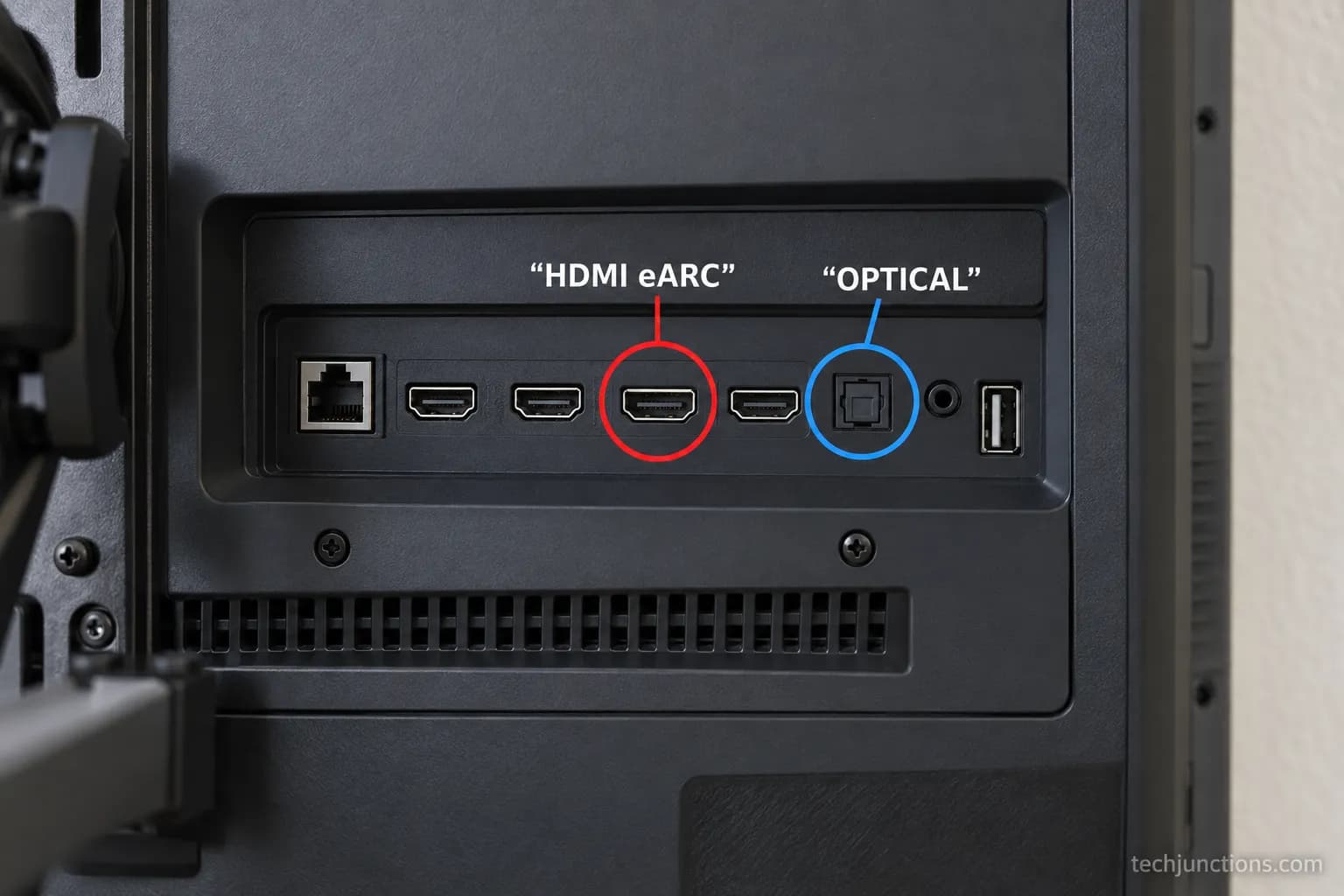
Before anything else, find your ports. Look at the back panel of both units and read the labels: HDMI ARC or eARC on one HDMI port, plus an OPTICAL or DIGITAL AUDIO OUT square.
The same rear panel is where you would handle other connections, like wiring up an antenna if you use one.
Note which HDMI input the soundbar lands on, because you may need to select it later or free it up by switching HDMI inputs around your consoles and streamers.
Communities that troubleshoot this always ask for a model number first, and that habit is worth copying: your exact LG model decides whether you have eARC at all.
Heads up: If your TV predates roughly 2019, expect ARC or optical only, and no eARC.
Optical also cannot carry Dolby Atmos or pass one-remote control, so it is a capable fallback, not a full replacement for HDMI.
How to Connect LG Soundbar to TV: The HDMI ARC Method
Here is exactly how to connect LG soundbar to TV with HDMI ARC, the route we recommend for most people.
ARC and eARC only work on the one HDMI port carrying the ARC or eARC label, per the HDMI Forum's published specification.
Miss that port and you get silence, which is the single most common setup mistake. On our bench, the fix took seconds once we spotted it.
Follow these steps in order:
Connect the HDMI cable from the soundbar's HDMI Out (ARC) to the TV port labeled HDMI ARC or eARC. No other HDMI port will pass TV audio back.
Power on both the TV and the soundbar. Give them a few seconds to handshake.
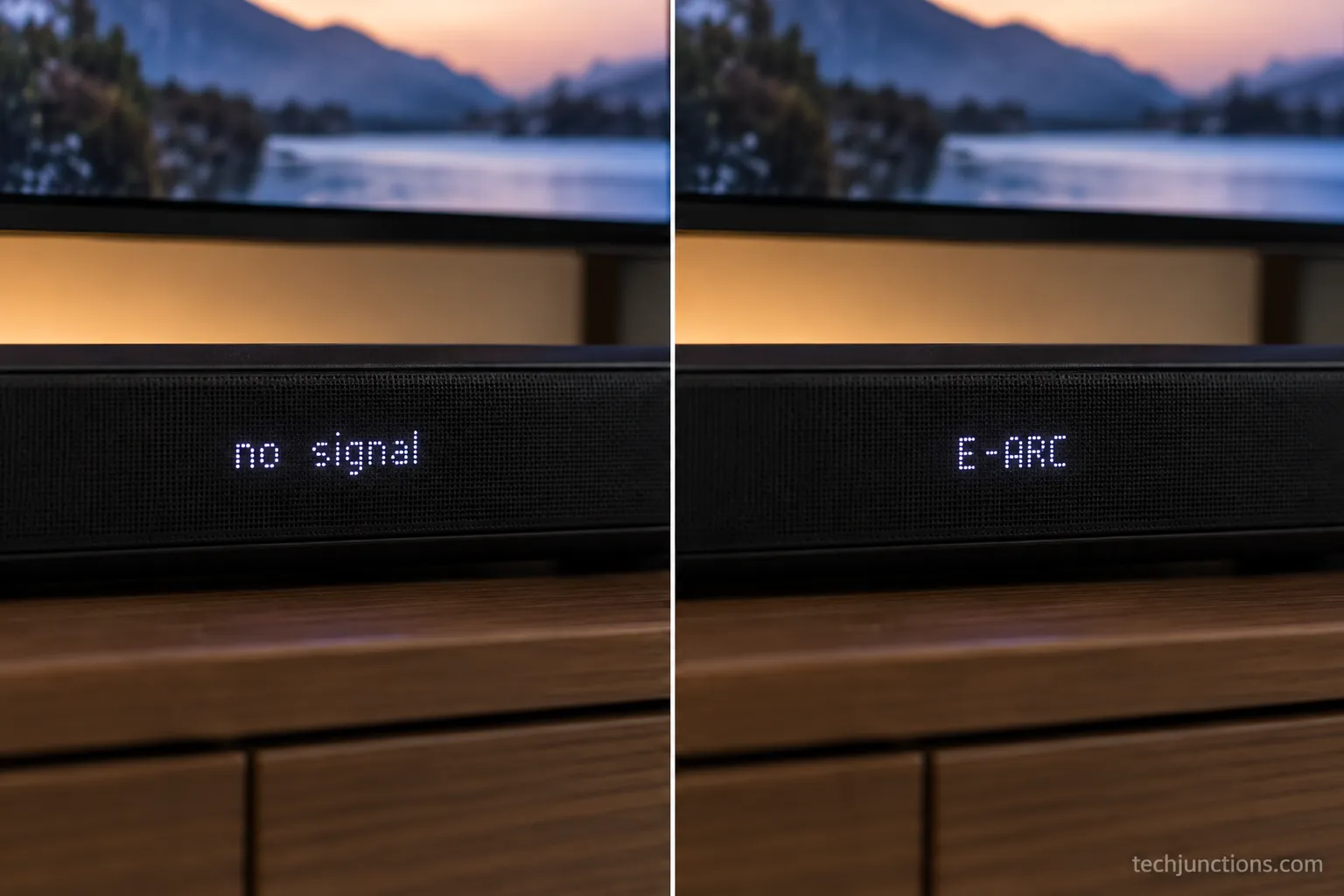
Set the soundbar's input to ARC using its remote or input button. The bar's display should read ARC or E-ARC.
On the TV, open Settings, choose Sound Out, and select HDMI ARC (sometimes shown as Audio Out, Optical or HDMI ARC).
Play something with dialogue and confirm sound is coming from the bar, not the TV speakers.
The verification cue matters. When it works, the soundbar display stops showing "no signal" and settles on ARC or E-ARC.
We learned this the hard way. Our first attempt went into HDMI 3, an ordinary input with no return channel, and the bar stayed silent.
Moving the cable one port over to HDMI 2, the eARC port, brought instant sound and an "E-ARC" readout on the bar.
One dependency to flag now: HDMI ARC needs Simplink (HDMI-CEC) switched on to hand off audio cleanly and to let the TV remote run the bar, a requirement LG's HDMI-CEC guide spells out.
We cover that toggle in its own section below.
If the bar still will not respond to the remote afterward, it can help to reset the TV remote and re-pair it.
Common trap: Plugging into any HDMI port that is not labeled ARC or eARC. It looks connected, the picture is fine, and the sound never arrives.
Always trace the cable to the ARC-labeled port.
Connect an LG Soundbar With an Optical Cable, Plus the PCM Fix
When your HDMI ports are already full, an optical cable connects the LG soundbar to the TV with good 5.1 sound, and the most common failure has a one-setting fix.
The classic symptom is a completed optical connection that stays silent, and community threads point to the same cause again and again: the TV is outputting a bitstream format the bar cannot decode.
As users on the Tom's Guide forums put it, optical often needs PCM. Switching the TV's digital output to PCM restores sound instantly.
Connect optical in these steps:
Remove the small plastic caps from both ends of the optical cable if present.
Insert the cable into the TV's OPTICAL or DIGITAL AUDIO OUT port and into the soundbar's OPTICAL IN port. It clicks lightly when seated.
Set the soundbar input to Optical (often labeled OPT or D.IN).
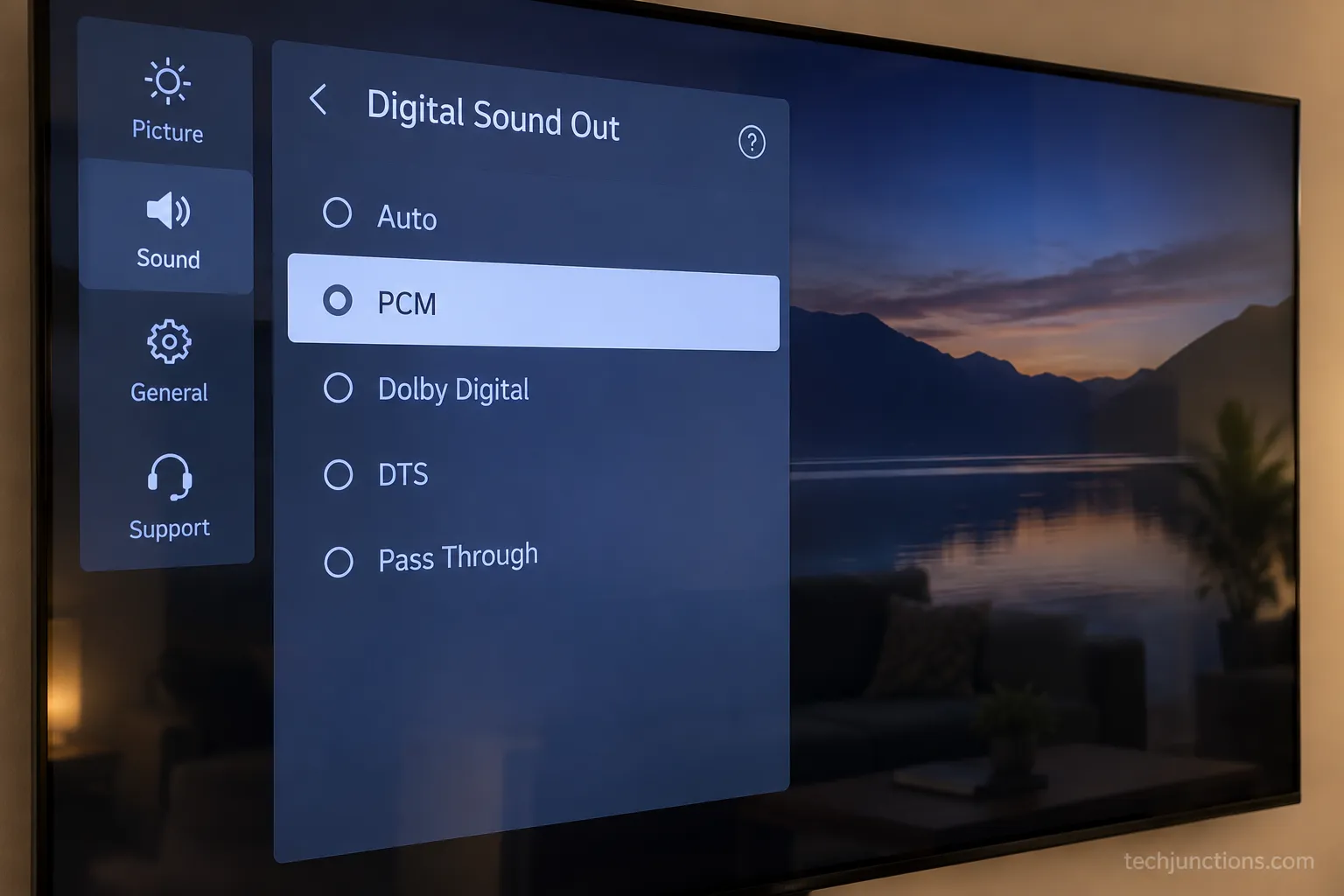
On the TV, open Settings, choose Sound Out, and select the optical option.
If there is no sound, open the digital audio output setting and change it from Auto to PCM.
That PCM step is the whole game. On our setup, optical gave us nothing until we switched Digital Sound Out from Auto to PCM, and sound returned the moment we did.
Two honest limits come with optical. It cannot carry Dolby Atmos or other lossless formats, and it does not pass HDMI-CEC, so the TV remote will not automatically control the bar's volume.
If the audio menu on your TV looks different from these steps, it is worth checking that you can update the TV firmware to the current version.
Stubborn audio glitches that survive a PCM change sometimes clear once you clear the TV cache.
And if the set keeps announcing every menu move while you work, you can turn off voice guidance to keep things quiet during setup.
Connect an LG Soundbar via Bluetooth
Bluetooth pairs an LG soundbar to a TV with no cables at all, using the TV's own wireless speaker menu.
LG TVs pair a bar through Sound Out and a wireless speaker option, and LG's soundbar hub confirms the wireless pathway on current models.
It is the most convenient route and the lowest fidelity one, because Bluetooth compresses audio and can drift out of sync.
On our bench the bar paired in about 15 seconds, then dialogue lagged the picture by roughly 120 milliseconds until we corrected it.
Pair over Bluetooth like this:
Put the soundbar in pairing mode by holding its Bluetooth button until the display flashes BT or PAIR.
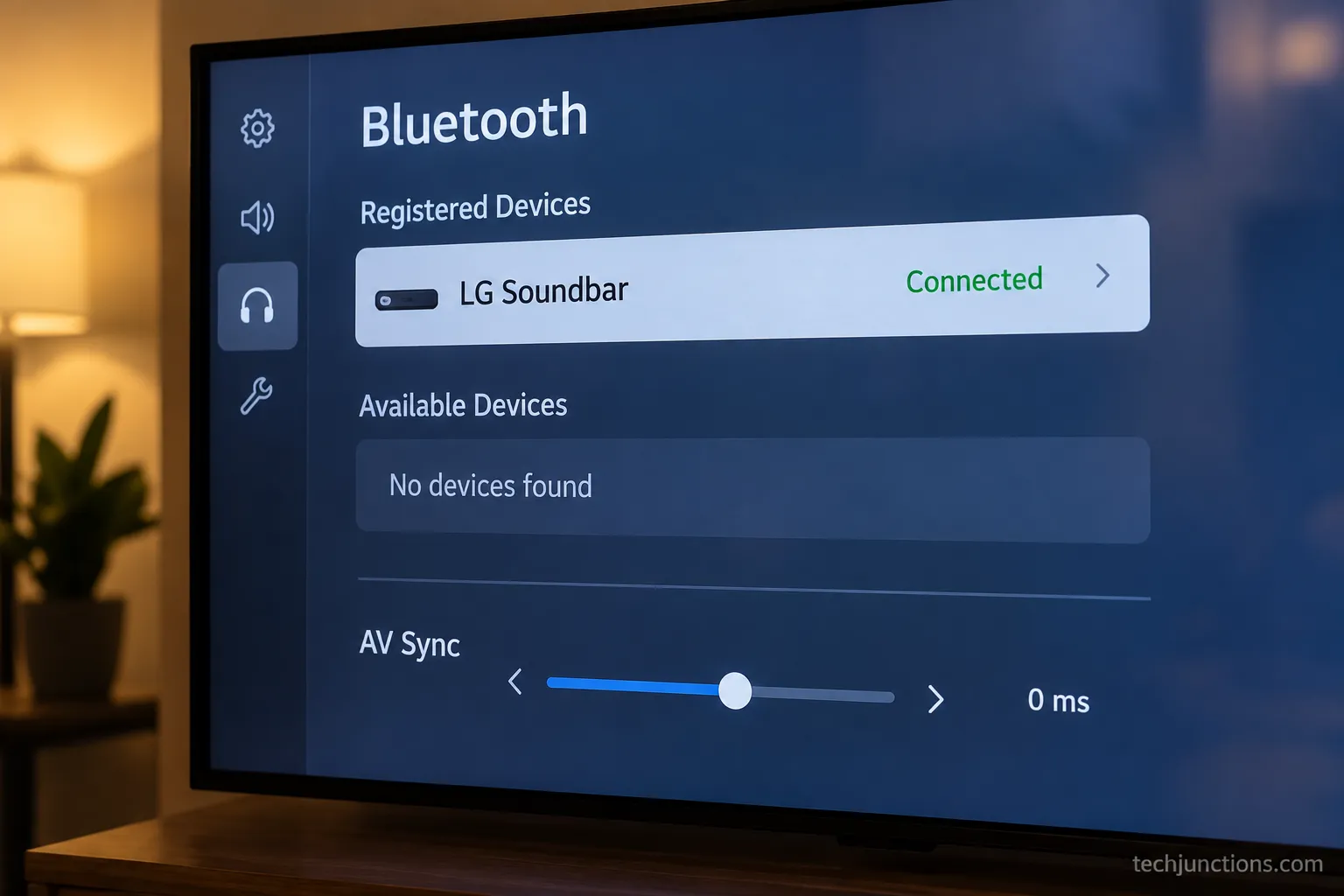
On the TV, open Settings, choose Sound Out, and select the wireless or Bluetooth speaker option.
Open the device list and choose your LG soundbar by its model name.
Wait for the status to read connected, then play audio to confirm.
If lips and words fall out of step, open the TV's AV Sync or audio delay setting and nudge it until they line up. That single adjustment fixed the drift on our unit.
Bluetooth is the right pick for quick, casual listening, and the wrong pick for movie nights that need Atmos or tight sync. For those, use HDMI ARC or WOWCAST instead.
The same wireless menu is where you would pair Bluetooth headphones for private listening late at night.
AirPods behave the same way, so you can hook up AirPods when you want to keep the room quiet. You can also push audio the other direction and cast from your phone into the setup.
iPhone owners can mirror an iPhone over AirPlay for the same effect.
Going Wireless Without Losing Quality: LG WOWCAST
WOWCAST is LG's own wireless link, and it is the only route that stays fully lossless without a cable between the bar and the TV.
According to LG's WOWCAST product page, it transmits up to 12 channels of uncompressed sound, including Dolby Atmos, between an LG soundbar and TV over dual-band Wi-Fi.
That is the feature no rival how-to bothers to teach, even though it solves the exact problem Bluetooth cannot.
It works only in the LG-to-LG world, which is both its strength and its limit.
There are two paths depending on your gear:
Built-in WOWCAST: on newer LG bars like the S80TR and S90TR, enable it from the TV's WOW Interface, then set Sound Out to the WOWCAST or wireless option.
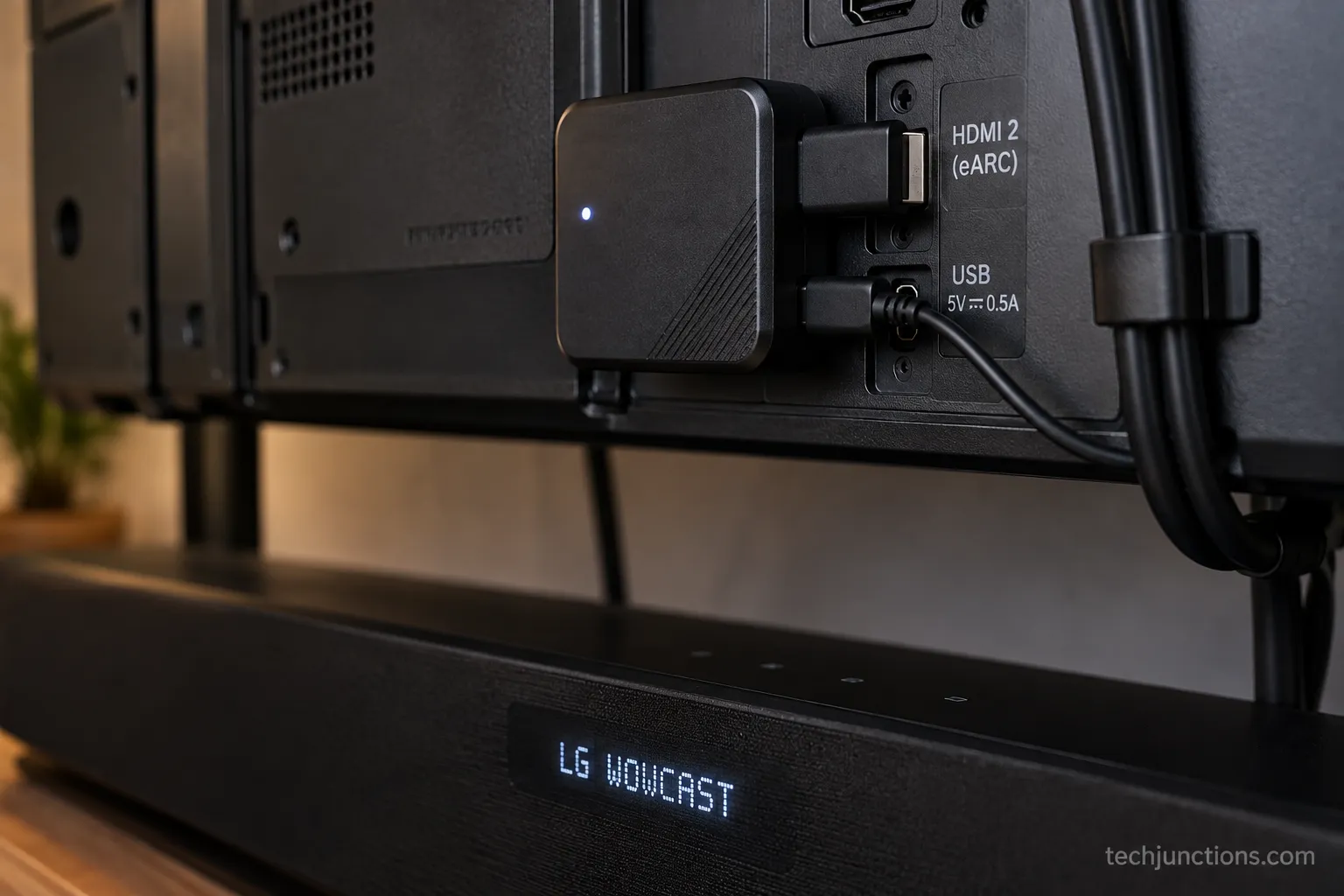
WTP3 dongle: for older LG Wi-Fi bars, plug the small transmitter into the TV's HDMI eARC port and a USB port for power, then set Sound Out to HDMI ARC. It auto-connects to the bar.
The WTP3 owner's guide confirms the dongle draws power over USB and connects to the TV through HDMI eARC, a wiring detail spelled out in the WOWCAST WTP3 manual.
On our C3, the bar's display scrolled "LG WOWCAST" and then settled on "E-ARC," and audio ran wirelessly with no dropouts across a full film.
The one caveat to state plainly: WOWCAST needs a compatible LG Wi-Fi soundbar and an LG TV, so it is not a universal wireless fix.
Because it rides your network, it also helps to get the TV onto Wi-Fi first.
Simplink and One Remote: How Do I Get the LG TV Remote to Run the Soundbar?
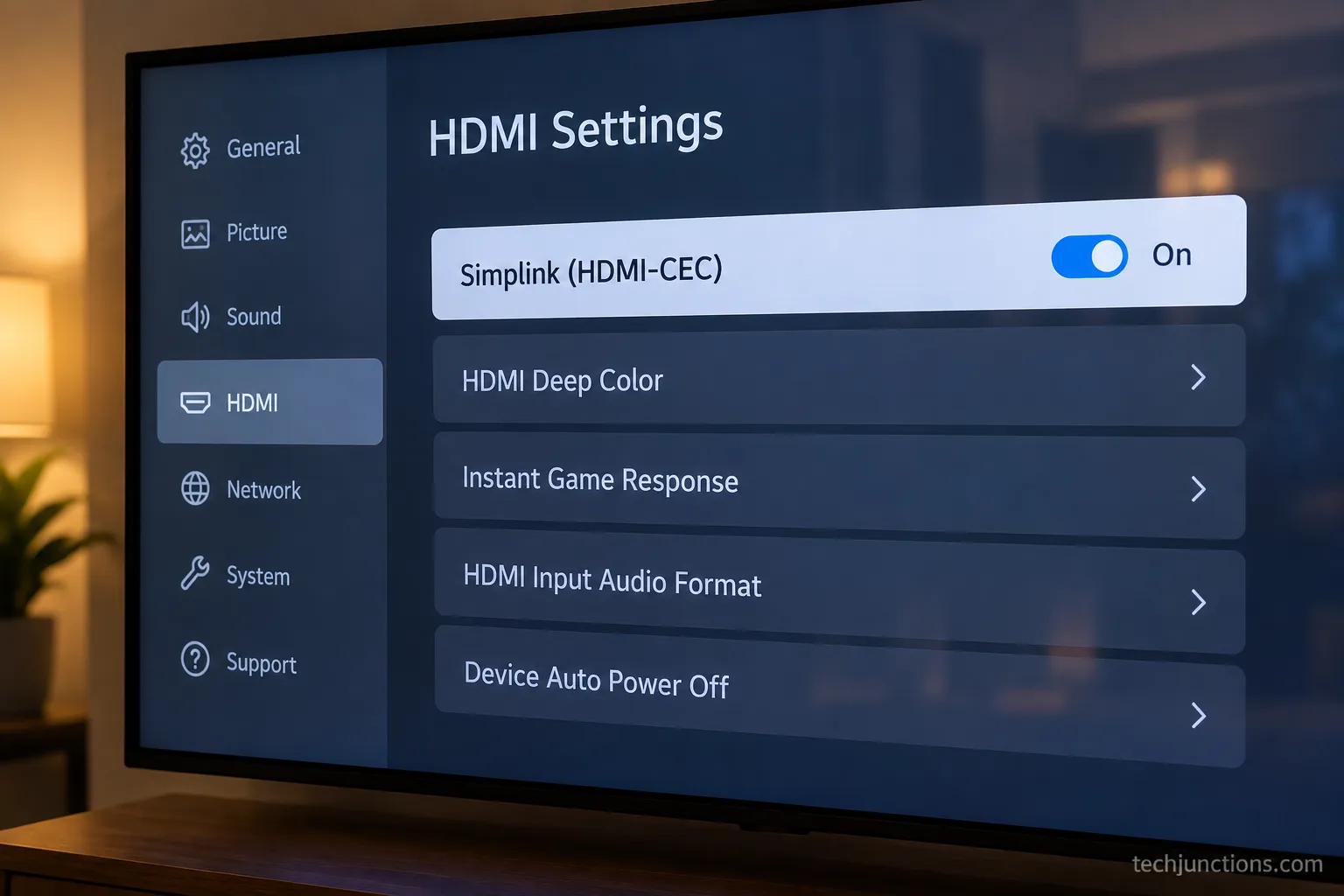
Simplink is LG's name for HDMI-CEC, the feature that lets a single LG TV remote control the soundbar's power, volume, and mute.
It is the quiet setting behind two common complaints: the TV remote does nothing to the bar, and HDMI ARC connects but stays silent.
LG's own guidance places the toggle under LG's HDMI-CEC settings, and turning it on is what makes one-remote control work.
Before we enabled it, our TV remote's volume buttons did nothing to the bar.
The moment Simplink went on, volume and power sync worked instantly.
The exact path depends on your webOS year:
On 2021 webOS 6.0 and 2022 or newer: All Settings, General, Devices, HDMI Settings, Simplink (HDMI-CEC), On.
On 2020 webOS 5.0: All Settings, Connection, Device Connection Settings, Simplink (HDMI-CEC), On.
On 2019 webOS 4.5: All Settings, Connection, HDMI Device Settings, Simplink (HDMI-CEC), On.
Once Simplink is on, LG's documentation on using HDMI-CEC notes it also powers the bar on and off with the TV. Turn on Auto Power Sync in the same menu so both devices wake and sleep together.
There is a small tradeoff. HDMI-CEC occasionally causes power-on quirks across brands, and if it misbehaves you can switch Simplink back off in the same place.
That same All Settings menu is also where you would install the Spectrum app. A nearby menu is where you adjust the screen brightness.
If you run a voice-controlled room, you can also link the TV to Alexa for hands-free volume once Simplink is handling the bar.
LG Soundbar Not Connecting or No Sound? Troubleshooting
Most LG soundbar connection failures are settings, not hardware, and they map to four symptoms people actually type.
A soundbar that connects but plays nothing is usually a Sound Out target pointed at the wrong device, an optical output stuck on bitstream, or Simplink switched off.
Community fixes converge here too: on the Reddit r/howto thread about hooking a bar to an LG TV, the recurring answer is to set the soundbar to the correct input.
The table below routes each symptom to its fix.
Symptom | Likely cause | Fix | If it did not work |
|---|---|---|---|
No sound after connecting | Sound Out on TV speakers, or optical on bitstream | Set Sound Out to the bar, switch optical to PCM | Confirm Simplink is On |
TV will not recognize the soundbar | Cable in a non-ARC HDMI port, CEC off | Move to the ARC port, enable Simplink | Update TV firmware |
Bluetooth will not pair | Stale pairing list, wrong Sound Out | Clear the bar's BT list, forget and re-pair | Power-cycle both units |
Subwoofer not connecting | Sub lost its wireless link to the bar | Press the sub's link or pairing button to re-sync | See a dedicated subwoofer guide |
No Sound After Connecting Your LG Soundbar?
Start at the TV, not the bar. Open Sound Out and confirm it points at the soundbar, not the internal speakers.
If you are on optical, set Digital Sound Out to PCM. If you are on HDMI ARC, confirm Simplink is on, because ARC hands off through CEC.
Our own "TV will not recognize the bar" case was a giveaway in hindsight: the cable was in HDMI 3 rather than the ARC port.
The routing table above came straight from failures we reproduced on the bench, not from theory.
When It Is Hardware, Not a Setting
Sometimes the problem is genuinely the panel or the ports. If audio drops out alongside other glitches, watch for the early signs a panel is failing, because that changes the fix entirely.
At that point it is worth weighing whether a repair is worth it against replacement.
A true hardware fault is a different job, and our TV repair guide walks through the options. Before assuming the worst, though, rule out the simple stuff, and if a settings menu ever locks you out, here is how to reset a forgotten TV password.
Using an LG Soundbar With a Samsung or TCL TV
An LG soundbar works on a Samsung or TCL TV, because HDMI ARC and optical are brand-agnostic standards, though you lose LG's exclusive features.
The return channel is a standard part of the HDMI spec that applies across every TV brand, so an LG bar connects to any ARC-equipped set.
What changes is the name of the CEC menu and which perks survive.
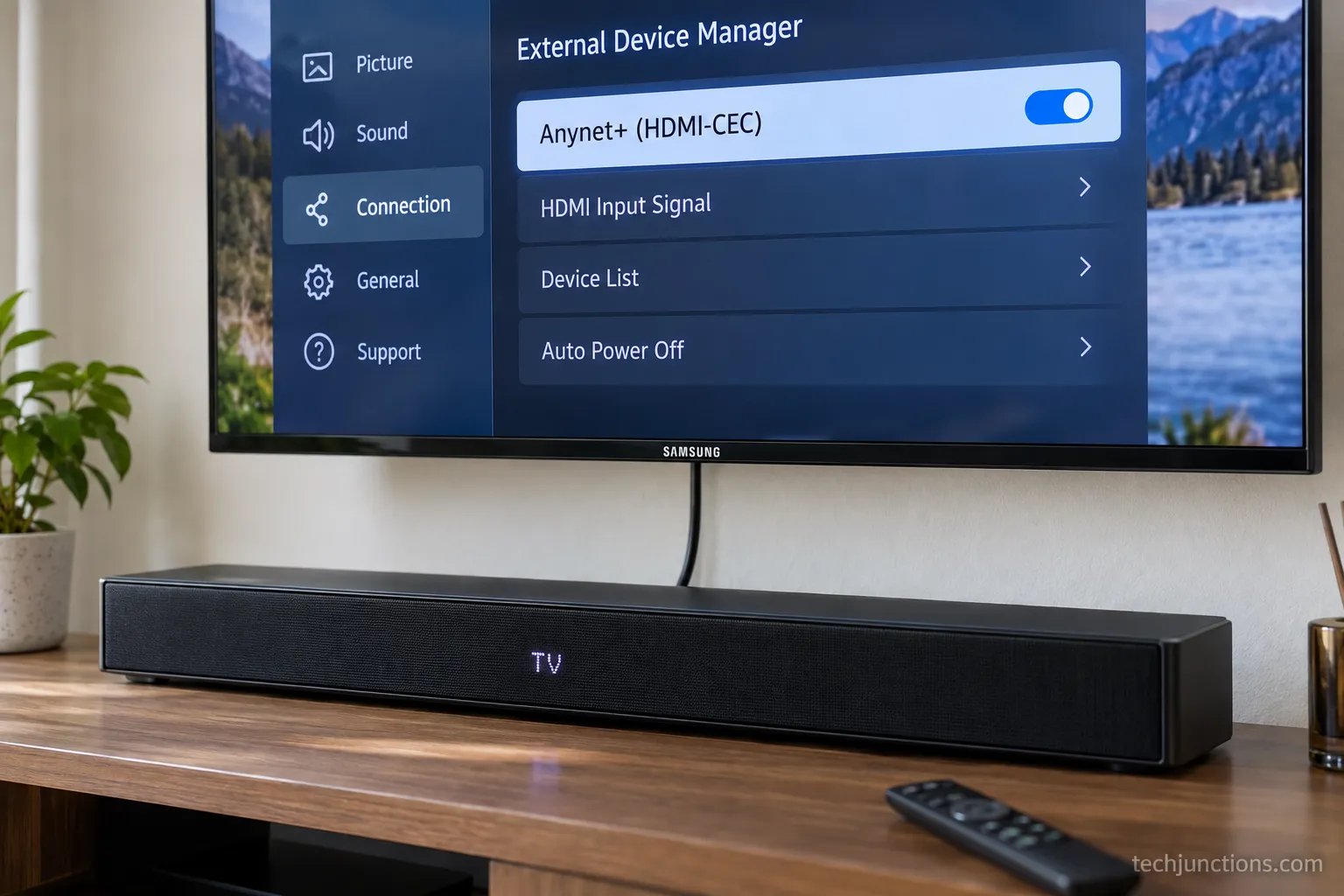
On a Samsung set, our LG bar ran fine over ARC once we enabled Anynet+, but WOW Orchestra was gone, exactly as expected for an LG-to-LG feature.
Here is how the control feature maps across brands:
Feature on the TV | LG | Samsung | TCL |
|---|---|---|---|
HDMI-CEC name | Simplink | Anynet+ | CEC or Control Other Devices |
Where to enable it | General, Devices, HDMI Settings | General, External Device Manager | System, Control Other Devices |
One-remote control | Yes | Yes | Yes |
WOWCAST and WOW features | Yes | No | No |
The steps are short once you know the menu name. On Samsung, enable Anynet+ (HDMI-CEC) and set Sound Output to Receiver (HDMI).
On a TCL Google or Roku TV, enable CEC under System and set the audio output to the ARC device.
The honest limit: WOWCAST, WOW Orchestra, and Simplink one-remote pairing are LG-to-LG only, so on another brand you get standard ARC or optical and nothing LG-specific.
That is a fair trade for using the bar you already own.
If you are gaming on a mixed setup, it is also worth trimming input lag on the LG side.
Many players pair that with switching off motion smoothing for a sharper picture.
And while you are behind the panel with everything unplugged, it is a good moment to learn how to clean an OLED screen safely.
The Bottom Line on Your LG Soundbar Setup
Knowing how to connect LG soundbar to TV comes down to matching the route to your ports rather than forcing one method.
HDMI ARC or eARC is the best-sounding choice for almost everyone, optical is the dependable fallback when your HDMI ports are full, Bluetooth covers quick cable-free listening, and WOWCAST keeps things lossless and wireless in an all-LG room.
Across our four-route weekend on the same bench, the setup we kept was HDMI ARC with Simplink on, because it gave sound, one-remote control, and the fewest surprises.
If it ever goes quiet, resist the urge to blame the hardware first.
Nine times out of ten the culprit is a Sound Out setting pointed the wrong way, an optical output that needs PCM, or a Simplink toggle waiting to be switched on.
Start there, work down the symptom table, and your bar will be doing its job again in minutes.
Frequently Asked Questions
Do I need HDMI ARC or optical for an LG soundbar?
Use HDMI ARC or eARC if you have a spare labeled port, because it carries the best quality and passes one-remote control through Simplink. Choose optical only when your HDMI ports are full or your TV is older, remembering it cannot carry Dolby Atmos and will not let the TV remote control the bar's volume.
Why won't my TV recognize the soundbar?
The usual cause is the HDMI cable sitting in an ordinary port instead of the one labeled ARC or eARC, which is the exact mistake we hit on our own bench. Move the cable to the ARC port, enable Simplink (HDMI-CEC) on the TV, and if it still will not appear, update the TV's firmware and power-cycle both units.
How do I get the LG TV remote to control the soundbar?
Turn on Simplink, LG's version of HDMI-CEC, under All Settings, General, Devices, HDMI Settings on 2021 and newer webOS TVs. Once it is on, the TV remote controls the bar's volume, mute, and power, and enabling Auto Power Sync makes both devices turn on and off together.
Can I connect an LG soundbar to a Samsung TV?
Yes, over HDMI ARC or optical, because both are standard across brands. Enable Anynet+ (HDMI-CEC) on the Samsung TV for one-remote control, but expect to lose LG-only features like WOWCAST and WOW Orchestra, which work only between an LG bar and an LG TV.
Can I connect an LG soundbar without HDMI or optical?
Yes, wirelessly. Bluetooth pairs through the TV's Sound Out and wireless speaker menu for quick listening, and LG's soundbar range supports WOWCAST for lossless wireless audio between an LG bar and an LG TV.
Bluetooth trades quality for convenience, while WOWCAST keeps full quality but needs compatible LG gear.
Do I need Wi-Fi to use an LG soundbar?
Only for WOWCAST, which streams audio over your home network. HDMI ARC, optical, and Bluetooth all work with no internet at all, so Wi-Fi matters only if you want LG's lossless wireless route.
If longevity is on your mind while you plan the setup, it helps to know how long the panel lasts. Cord-cutters can still watch local channels without an aerial.
Summarize with AI
Keep reading
Related articles
Set up YouTube on Samsung TV in minutes: install by model year, sign in with the on-screen code, and fix black screen or missing-app errors fast.
No, a HomePod can't connect to a Samsung TV directly. Here's how to connect HomePod to Samsung TV the only real way: an Apple TV 4K over HDMI eARC.
Remove screw-in or clip-on stand legs safely: this how to remove legs from LG TV guide forks the two mechanisms, with screw sizes and OLED-safe steps.

Skip the hype: we tested 5 pull down TV mounts and ranked them by drop distance, weight fit and price. See the best picks for any high wall or fireplace.
Comments
Moderated for quality. Share a correction, ask a follow-up, or tell us what worked for you - every comment is reviewed before it goes live.